
A digital photo frame for families

The whole family's photos, in one frame at home

SweetFrame is a photo frame with a touch screen. Children, grandchildren and cousins send photos from their phones to a shared Google Drive folder, and within minutes they appear on the frame, with the time, the weather, birthdays and Shabbat times. No special app, and your photos never pass through us.

The frame's interface and the family guides are in Hebrew. Do you have a Nightscout site, where you see the glucose readings from a sensor? The frame can also show the latest reading in a corner, with no sounds and no alerts (optional). About the glucose display

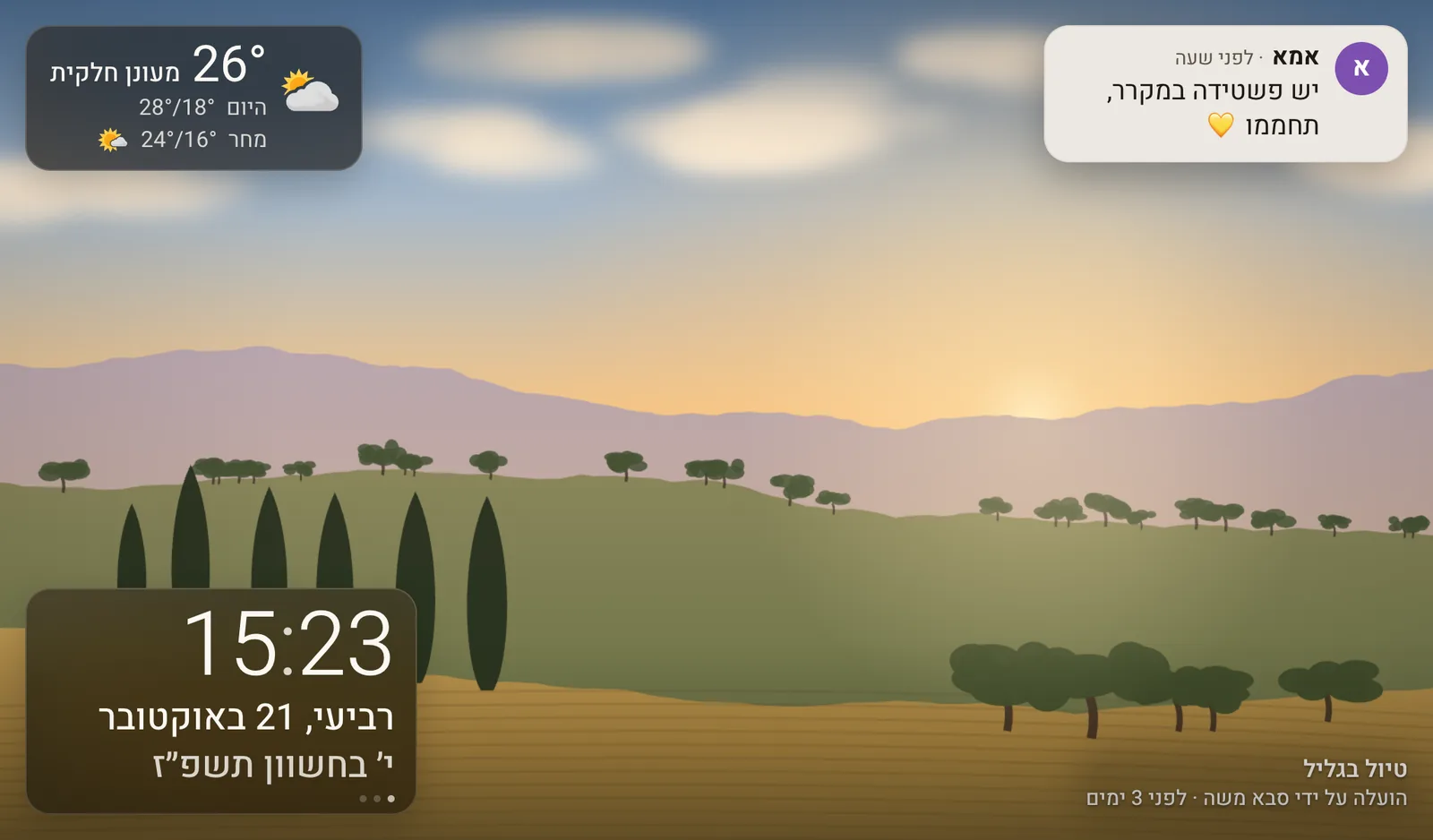
The frame shows a drawn landscape photo. In the corners, in Hebrew: the weather (26 degrees, partly cloudy), a note from Mum saying “There's a quiche in the fridge, warm it up”, the time 15:23 with the Gregorian and Hebrew dates, and under the photo “Trip to the Galilee, uploaded by Grandpa Moshe 3 days ago”.
Illustration. All photos on this site are drawn.

How it works

Three steps, and then the frame runs by itself.

  1. We prepare the frame

    We prepare the frame and connect it to Google. You only plug it in, and a short on-screen wizard asks for your Wi‑Fi network and your town (for the weather and Shabbat times). It takes about 5 minutes.

  2. You share a Google Drive folder

    Create a folder, for example “Photos for the frame”, and share it with the frame's address (a long address that the frame shows on its screen with a QR code), with view-only access. Then approve the folder in the frame's Settings → Photos.

  3. The family sends photos

    Everyone the folder is shared with uploads photos and short videos from their phone with the Google Drive app. Within minutes they are on the frame, with the sender's name.

What you need at home: Wi‑Fi, power near the frame's spot, and one person in the family with a Google account.

How SweetFrame uses Google

SweetFrame works with Google Drive in two separate ways. Neither one sends your data to us.

Photos: the frame's own read-only address

Each frame has its own Google identity (a service account). You share a Drive folder, and optionally a calendar, with that address, with view-only access. The frame downloads the photos and shows them; it never uploads, changes or deletes anything, and it sees nothing that was not shared with it and approved on the frame. This part does not use a SweetFrame Google sign-in: nobody signs in or grants a permission here.

Settings backup: optional, with the drive.file permission

In an upcoming software update, you can connect your own Google account on the frame's screen (you approve a code at google.com/device). The frame then keeps one backup file of its settings in a “SweetFrame” folder in your Drive, to restore them on a new frame. drive.file is the only permission the SweetFrame consent screen asks for, and it gives access only to the files SweetFrame created there. The backup goes straight from the frame to your Drive.

SweetFrame's use of information received from Google APIs follows the Google API Services User Data Policy, including the Limited Use requirements: our Limited Use statement.

Details in the privacy policy

What the frame shows

Photos first. Around them, a few small things that help at home.

  • Portrait pairs and memoriesTwo portrait photos side by side; photos from this day in past years come back.
  • Short videosVideos from the folder play silently, just their beginning.
  • Family notesA short note sent from a paired phone at home, on the frame's Wi‑Fi, appears in a corner, like a note on the fridge.
  • Calendar and birthdaysGregorian or Hebrew-date birthdays, a shared Google calendar, and holidays, in a corner of the screen.
  • WeatherNow, today and tomorrow, with a small reminder when rain is expected.
  • Night sleep and guest modeThe screen sleeps at night; guest mode hides glucose, calendar and notes.
The Shabbat screen, in Hebrew: “Shabbat Shalom”, Friday night, 13 Cheshvan 5787, the time 19:42, Shabbat ends at 18:37, and the weather, next to a drawing of two lit candles, a covered challah and a cup.
The Shabbat screen, illustration.

Shabbat and holidays

The frame knows candle-lighting and Shabbat end times for your town and the weekly Torah portion. You choose what it does on Shabbat and holidays (or turn this off): information only, a calm Shabbat screen with candles, or a full Shabbat mode where everything is set in advance and the frame does not respond to touch.

These modes are convenience tools. The frame has not been approved by any halachic authority for use on Shabbat, and times may differ slightly from your community's calendar. How to use it on Shabbat and holidays is your decision; we recommend consulting a rabbi.

Optional

A glucose reading in a corner, for those who want it

Nightscout is a personal website that families set up to see the glucose readings from a sensor from anywhere. If you have one, you can turn on a quiet display of the latest reading in a corner of the screen: no sounds and no alerts, and the screen is off during sleep hours. The frame reads the site with a read-only access code (a token), cannot change anything on it, and never sends the readings anywhere.

SweetFrame has not been tested or cleared as a medical device and is not intended to be used as one. The display is for information only, and readings may be delayed, missing or wrong. Never make treatment decisions (such as insulin dosing or treating a low) based on the frame: always check the CGM device or the official app, and follow your medical team's instructions.

Questions?

Write to us and we will be glad to help.

Want a SweetFrame? Write to us and we will get back to you.

What to include in a request · Terms of use

Powered by TechRS